
OpenLogix
Project overview
November 2026
What is Open Logix?
- An open source foundation for enabling FPGA design tools.
- Free to use and adapt, under MIT or Apache 2.0, your choice.
- An extensible, open board model and catalog.
- An MCP engine to build, verify and program the boards.
- An intuitive open API for third-party tools, AI agents and automation, in any language.
- Ready-made frontends for IDE, command-line and schematic-based design.
- Runs on macOS, Windows and Linux.
How it fits together
 Logix IDEwrite code, click to run
 Logix CLIcommands and scripts
 Logix Studiodraw schematics
 Logix Remoteconnects to remote frontends
 Logix Catalogopen, extensible board catalog
 Logix Enginebuild · verify · simulate · program
Logix Catalog
Every FPGA board, described once.
- FPGAs and boards: definitions of the supported FPGAs and boards.
- Board resources: LEDs, buttons, clocks, UARTs, headers and more, mapped to FPGA pins.
- Custom boards: users provide their own definitions, in the same format.
- Source of truth: drives FPGA operations and code generation.
- Designed for partial information: boards start with what's known and grow over time.
- Language independent: based on standard JSON.
- Open data: free to use and copy; served to any tool through Logix Engine.
- Grows with the community: a custom board becomes a contribution with one pull request.
Catalog family model
People see chip families. The engine maps each to a toolchain.
ice40ecp5gowinopenxc7The catalog has one FPGA file per family, and a board gets its family from its FPGA. Toolchains are internal to the engine.
Catalog board resources
What each board's pins are wired to, by name.
Any resource can also give its I/O standard, its source, and what it needs, such as a jumper.
Logix Engine
One engine. Every FPGA tool.
- Abstracts FPGA operations: build, verify, simulate and program the board.
- Manages its tools and catalog: no setup by the user.
- Intuitive API: standard MCP over stdin/stdout.
- Any language: a frontend launches it as a child process and calls its tools.
- For AI agents and plain programs: IDEs, scripts and CI use the same API.
- Self-discovery by AI agents: for ad-hoc operations, scripts and frontends.
- Explicit and stateless: each request names its files, folders and board.
- One native executable: nothing else to install.
Open Logix Frontends
Many ways to work. One engine.
- Built on Logix Engine and Catalog: reuse data and logic, focus on the user experience.
- Their own model: each defines its own project model and design paradigm.
- Their own examples: each creates its examples based on Logix Catalog.
- Simple installation: one download, no toolchain to install.
- Third-party frontends welcome: leveraging the Logix Engine API and sample frontends.
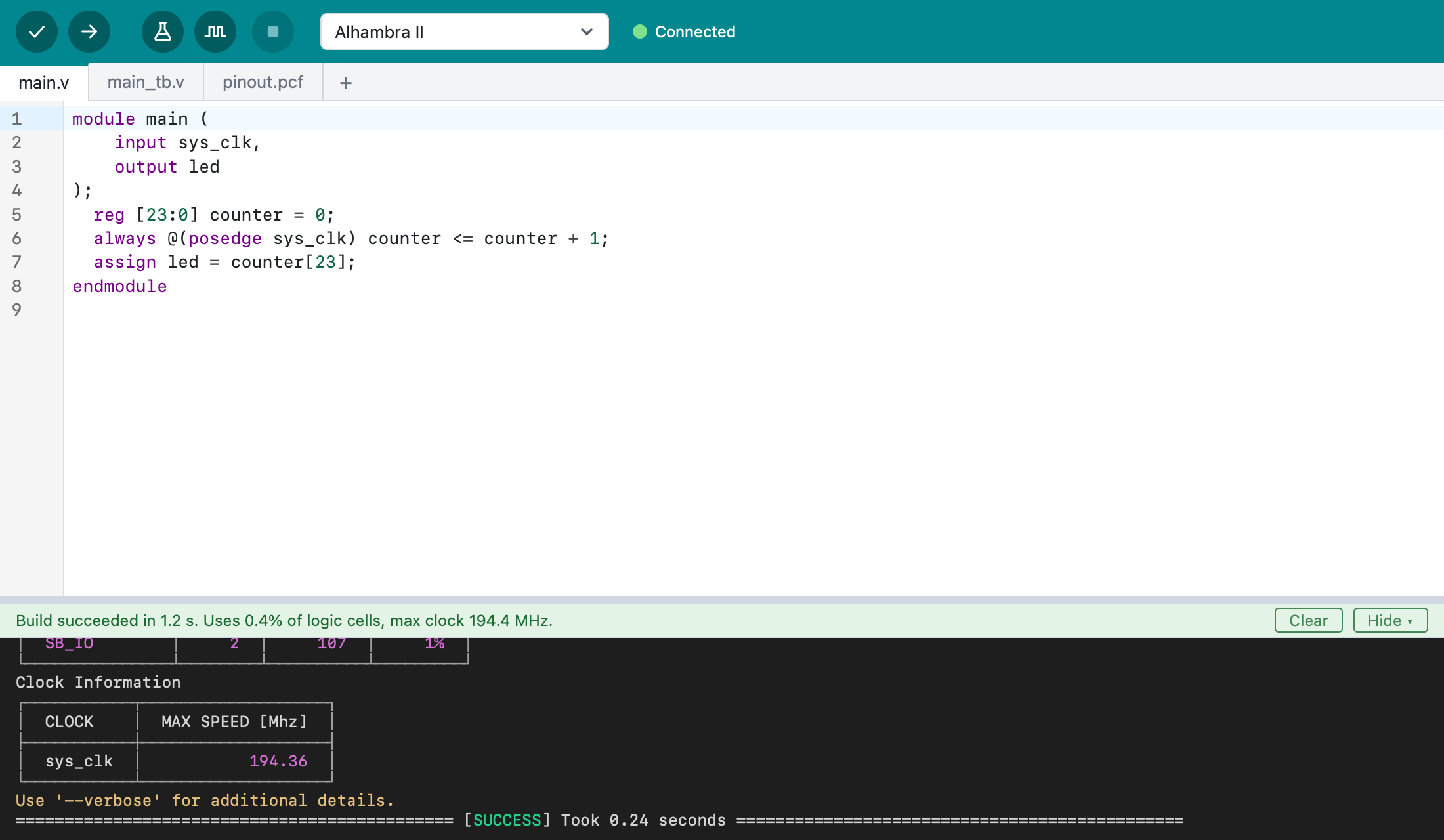
Logix IDE
The Arduino experience, for FPGAs.
- An Arduino-like IDE frontend: inspired by Arduino's minimalist look and feel.
- The whole design cycle: edit, verify, build, test, simulate and run on the board.
- Simple installation: one download, no toolchain to set up.
- Manages its dependencies: Logix Engine, Logix Catalog and their tools.
- Simple projects: the sources and a small project file in a single directory.
- Custom boards, if needed: use your own board definitions.
- Ready to start: example projects, and template projects for new ones.
- Runs on macOS, Windows and Linux. Available Q4 2026.
Logix IDE is not affiliated with or endorsed by Arduino. Arduino is a trademark of Arduino SA.
Logix IDE
Logix CLI
FPGA builds, from the command line.
- A command-line frontend: inspired by Apio.
- One command, one operation: each
logix <command> <args>does one thing. - The whole design cycle: verify, build, test, simulate and run on the board.
- Simple installation: one download, no toolchain to set up.
- Manages its dependencies: Logix Engine, Logix Catalog and their tools.
- Custom boards, if needed: use your own board definitions.
- Ready to start: example projects, and template projects for new ones.
- Runs on macOS, Windows and Linux. Available Q1 2027.
Logix Studio
Draw your FPGA design.
- A schematic-based frontend: inspired by IceStudio.
- The whole design cycle: draw, verify, build, test, simulate and run on the board.
- Simple installation: one download, no toolchain to set up.
- Manages its dependencies: Logix Engine, Logix Catalog and their tools.
- Custom boards, if needed: use your own board definitions.
- Ready to start: example projects, and template projects for new ones.
- Runs on macOS, Windows and Linux. Available Q1 2027.
AI agents, directly
Any MCP agent can use Logix Engine, with no frontend.
- Connect once: add the engine to an agent such as Claude Code.
- Ask in plain words: the agent learns the tools from the engine itself.
- End to end: it writes the design, builds it and programs the board.
- Done already: an agent changed a design, built it and programmed an Alhambra II through the engine alone.
- Runs on macOS, Windows and Linux. Available Q4 2026.
AI agents write scripts
A one-off request becomes a repeatable operation.
- Ask once: "Write a Python script that builds my project and programs the board."
- Run it anytime: from the shell, a Makefile or CI, with no AI involved.
- Any language: Python, JavaScript, Rust or any other language with an MCP client.
- Runs on macOS, Windows and Linux. Available Q4 2026.
Third-party frontends
Anyone can build on Logix Engine and Logix Catalog. A few ideas:
- Editor extensions: JetBrains, Neovim, Emacs or Zed (Logix VSCode covers VS Code).
- Web frontends: nothing to install, with the engine in the browser (planned) or via Logix Remote.
- Python and other languages: Amaranth, LiteX or MyHDL designs, built by the engine.
- Test automation: scripts and CI that build designs, run testbenches and program boards.
- Tool testing: regression suites that check the open source FPGA tools on many boards.
- Education: classroom tools, labs and automatic grading.
- Board makers: factory tests and setup tools, using the board's catalog entry.
Looking ahead
Longer-term goals.
- Remote development: work with boards anywhere on the network, with Logix Remote.
- Shared libraries: reusable design code across frontends, with Logix Lib.
- Closing the test loop: tests that run on the real board, with Logix HIL (hardware in the loop).
- Learning: Open Logix training material and media.
Additional Resources
Where to go next.
openlogix.org
GitHubAll the code, data and docsgithub.com/openlogix
Logix IDEDownload a previewgithub.com/openlogix/logix-ide/releases
Logix IDE docsInstall, use and examplesopenlogix.org/logix-ide
Logix Engine docsThe tool API and a Claude Code tutorialopenlogix.org/logix-engine
Logix Catalog docsThe boards, and how to add oneopenlogix.org/logix-catalog
These slidesShare the overviewopenlogix.org/overview