Logix IDE
"The Arduino experience, for FPGAs."
Logix IDE (Logix for short) is a simple IDE for FPGAs, in the spirit of the Arduino IDE. Write your design in Verilog, click Verify to check it and Upload to program your board.
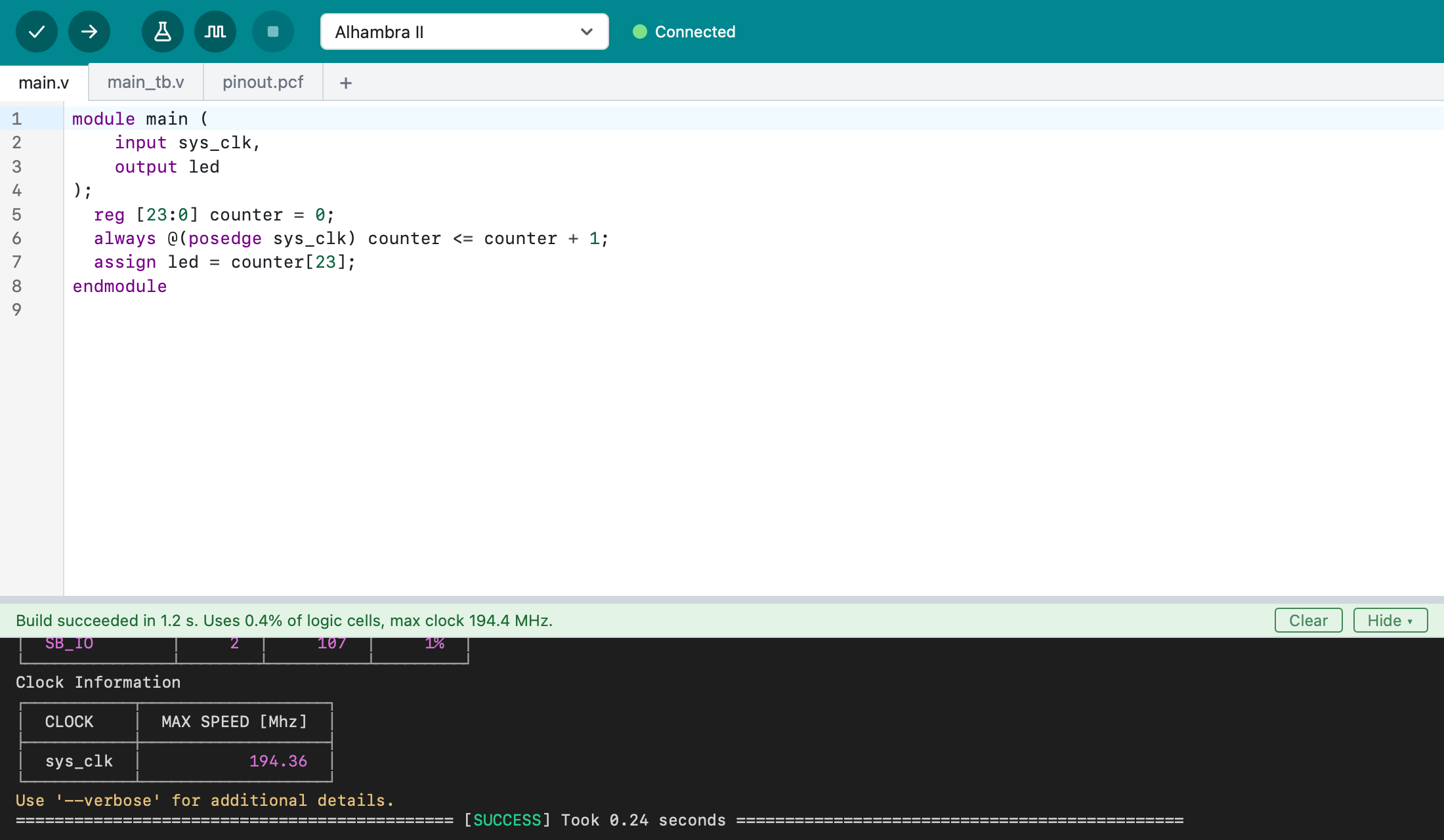
Behind the scenes, Logix uses Apio and its open source FPGA tools. You don't need to know Apio or install anything else: Logix downloads what it needs on its first start.
What Logix does
- Edit Verilog and SystemVerilog, with syntax colors, mistakes underlined as you type, tabs for the project's files, and Auto Format.
- Verify a design: lint it for common mistakes, build it, and see how much of the FPGA it uses and how fast it can run.
- Upload it to your board; Logix shows when it's connected.
- Test it with testbenches, and simulate it to see the signals in GTKWave.
- Learn from more than a hundred examples for over a hundred boards.
- See your design as a diagram.
Platforms
Logix runs on macOS with Apple Silicon for now. Windows and Linux are planned.
Next steps
- A tour of Logix: what's on the screen and how it all fits together.
- Install Logix
- Quick start: from a new project to a blinking LED.